
Comparison
Network Weather vs Aternity
Aternity's "home network visibility" reads WiFi RSSI and SSID from the operating system and presents it as a feature. Its "self-service" runs IT-authored PowerShell scripts: flush DNS, restart Teams, clear browser cache. These are generic remediation actions, not network diagnostics. Network Weather goes deeper: inside the router, across the LAN, and into the firmware.
The home network blind spot
What Aternity cannot see, and what Network Weather fills
Repackaged WiFi telemetry
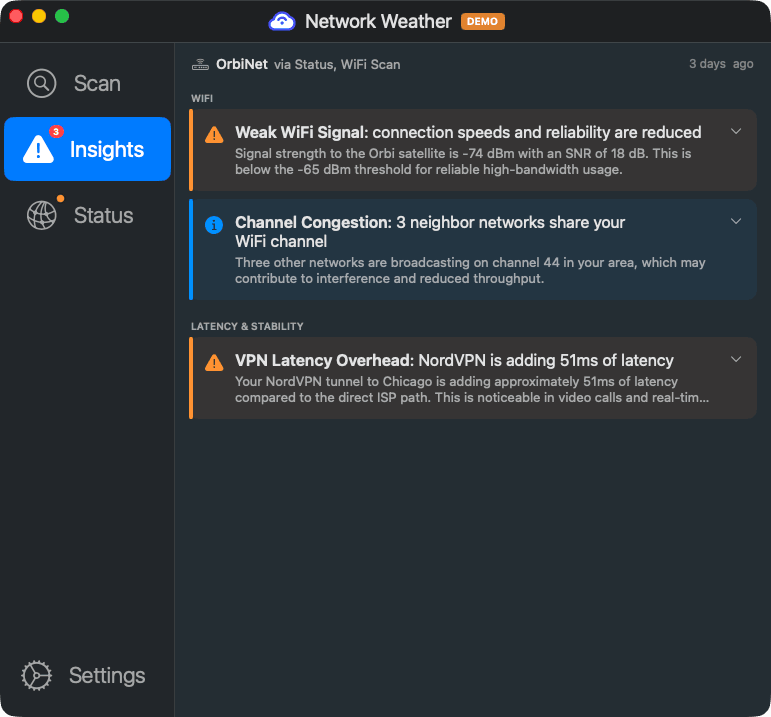
Aternity's "home network visibility" reads the same RSSI and SSID data that the operating system already provides. It presents this as a feature, but it is not discovering anything new about the network. Network Weather performs active radio environment scanning with 802.11 IE parsing, neighbor AP enumeration, SNR, and noise floor analysis.
Zero security scanning
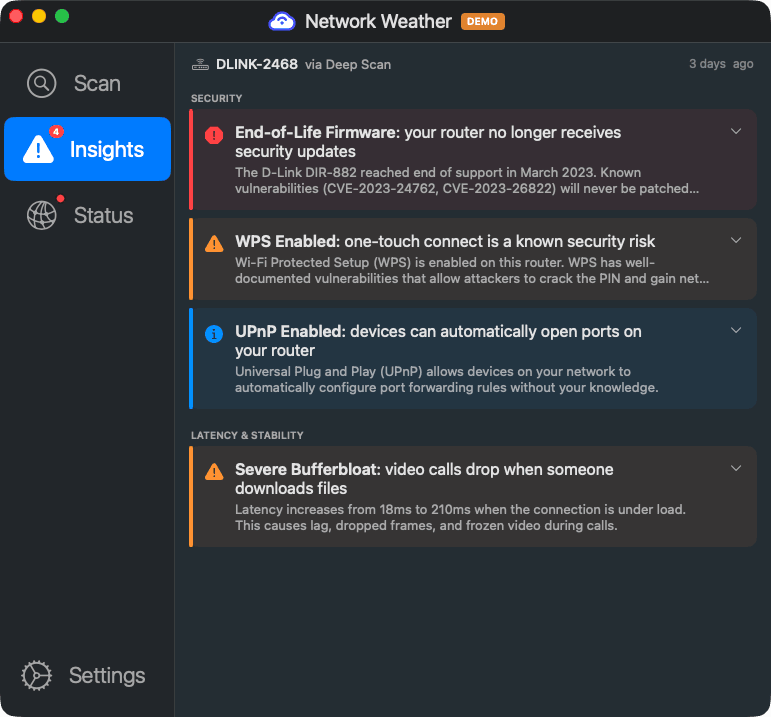
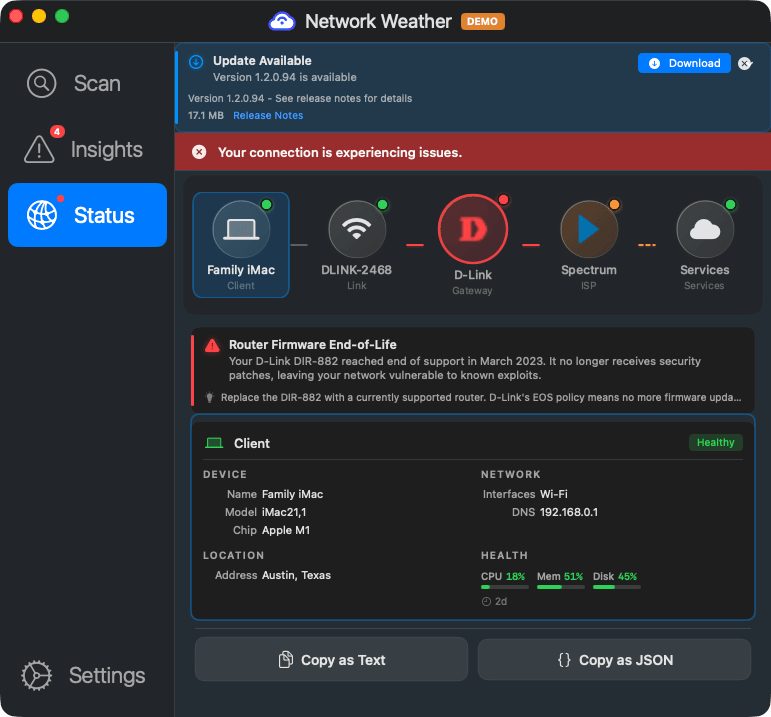
No gateway detection. No firmware checks. No CVE lookups. No UPnP or WPS auditing. No default password detection. Aternity is a device and application monitoring tool. It does not look at the network infrastructure at all. Network Weather does.
Script-based "self-service"
Aternity's Self-Service product runs IT-authored PowerShell scripts on the endpoint: flush DNS, restart Teams, clear browser cache. These are generic remediation actions, not network-specific diagnosis. Network Weather identifies the actual router model and gives the employee specific steps for their specific hardware.
Fortune 500 pricing and minimums
500-endpoint minimum. Enterprise sales cycle. No consumer tier, no SMB tier, no MSP offering. If you are not a large enterprise, Aternity is not an option. Network Weather is free for consumers, with MSP and enterprise pricing available.
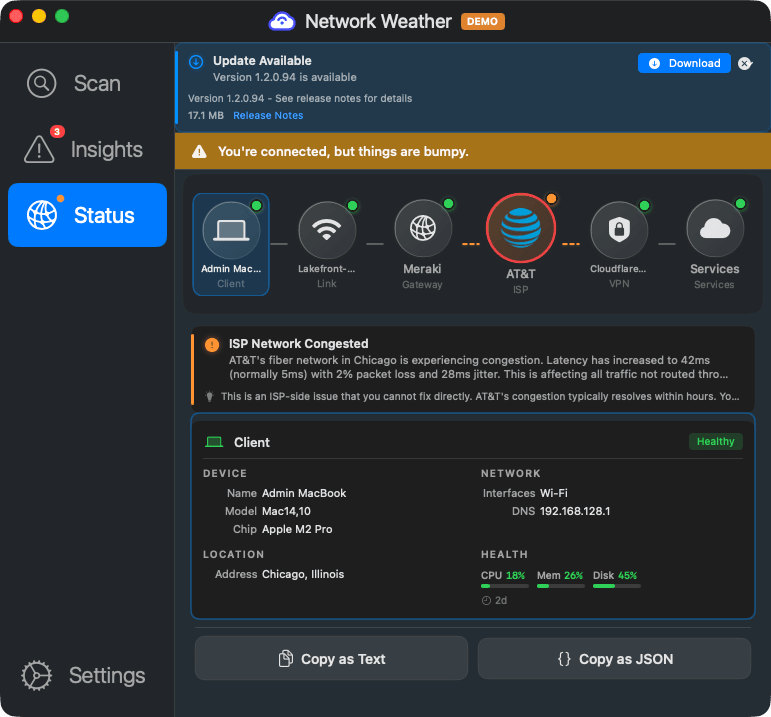
Aternity's own research found that 43% of employees report unified communications issues, with an average ticket resolution time of 43 minutes. The problem is not lack of telemetry; it is that the telemetry does not reach the actual cause, which is often the home router or ISP gateway.
What your remote workers actually see
Network Weather gives employees answers, not dashboards
Side-by-side feature comparison
What each tool covers at the home network level
| Capability | Aternity | Network Weather |
|---|---|---|
| WiFi signal strength (RSSI) | ✓ OS-level + Intel adapter | ✓ Plus radio environment scan, SNR, noise floor |
| WiFi channel interference scanning | ✗ | ✓ Neighbor AP enumeration |
| Radio environment scanning (802.11 IE parsing) | ✗ | ✓ BSSID resolution, AP vendor detection |
| Gateway vendor/model detection | ✗ | ✓ 11+ brands via UPnP, mDNS, HTTP fingerprint |
| Gateway vendor API integration | ✗ | ✓ UniFi, ASUS, TP-Link, Netgear, Eero, and more |
| Firmware version check | ✗ | ✓ With vendor API integration |
| End-of-life / end-of-support detection | ✗ | ✓ Vendor EOL databases |
| CVE lookup for router firmware | ✗ | ✓ |
| UPnP / WPS exposure detection | ✗ | ✓ |
| Default password detection | ✗ | ✓ |
| LAN device enumeration (ARP, DHCP) | ✗ | ✓ |
| ISP gateway / cable modem detection | ✗ | ✓ |
| VPN detection and performance attribution | Basic (VPN connected/disconnected) | ✓ Any VPN, latency attribution |
| Network path tracing | ✗ | ✓ Traceroute with ISP identification |
| End-user self-triage with fix guidance | IT-authored PowerShell scripts | ✓ Plain-English, hardware-specific |
| Works offline | ✗ | ✓ Guidance available even when connection is down |
| UCaaS quality monitoring | ✓ Via Aternity 360 | Forthcoming Q3 2026 |
| Compliance visibility (router infrastructure) | ✗ | ✓ Vendor, model, firmware, EOL, security posture |
| Application performance monitoring | ✓ Deep APM | Network-focused (not APM) |
| Standalone (no platform prerequisite) | ✗ 500-endpoint minimum | ✓ |
| Free consumer tier | ✗ | ✓ |
Who should use Aternity vs Network Weather
They solve different problems. Sometimes you need both.
Choose Aternity when you need
- Enterprise-scale endpoint fleet management (4M+ endpoints)
- Application performance monitoring and crash analytics
- Device health correlation with user productivity metrics
- IT-authored remediation scripts pushed to endpoints
- Gartner MQ pedigree for procurement justification
Choose Network Weather when you need
- Verify employees connect from compliant network infrastructure: router vendor, model, firmware currency, EOL status, and security posture for audits and attestations (SOC 2, HIPAA, FedRAMP, CMMC)
- Employee self-triage with specific, hardware-aware fix instructions
- Security scanning of remote worker home networks (CVEs, EOL, UPnP, WPS)
- WiFi environment scanning with neighbor AP and channel interference data
- A tool that works without a 500-endpoint minimum or enterprise contract
Aternity monitors the endpoint. Network Weather monitors the network the endpoint sits on. If your remote workers' 43-minute ticket resolution times are driven by home network issues, Network Weather addresses the root cause that Aternity's WiFi telemetry can point at but not diagnose.
Go deeper than WiFi signal strength
Give your remote workers the tools to diagnose and fix their own home network issues. No endpoint minimums, no enterprise contract.