
Comparison
Network Weather vs Zscaler ZDX
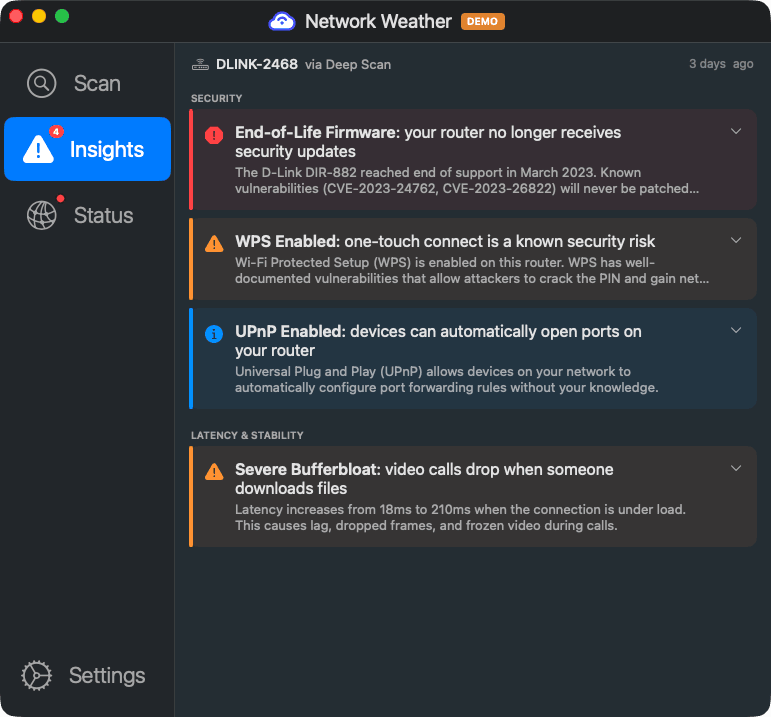
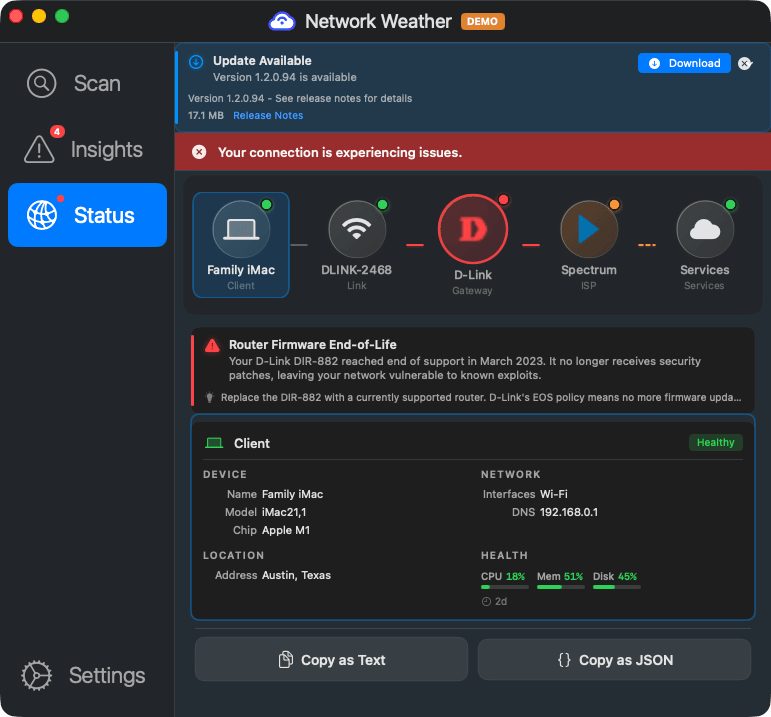
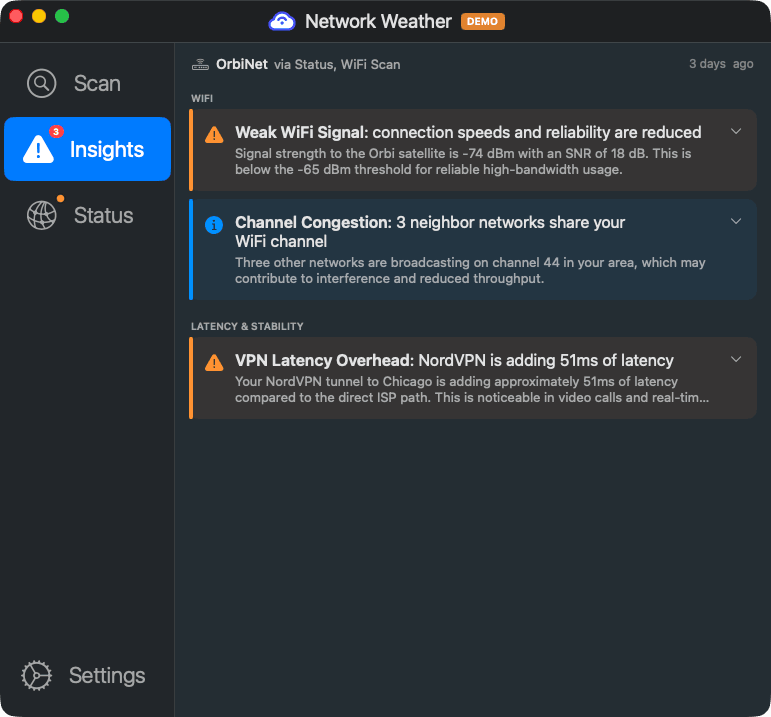
ZDX tells your remote workers their WiFi is weak, then stops. It cannot identify the router, check its firmware, or guide the employee through a fix. Network Weather goes inside the home network: detecting the gateway, scanning for security issues, and delivering plain-English remediation the user can act on without filing a ticket.
The home network blind spot
What Zscaler ZDX cannot see, and what Network Weather fills
No gateway detection
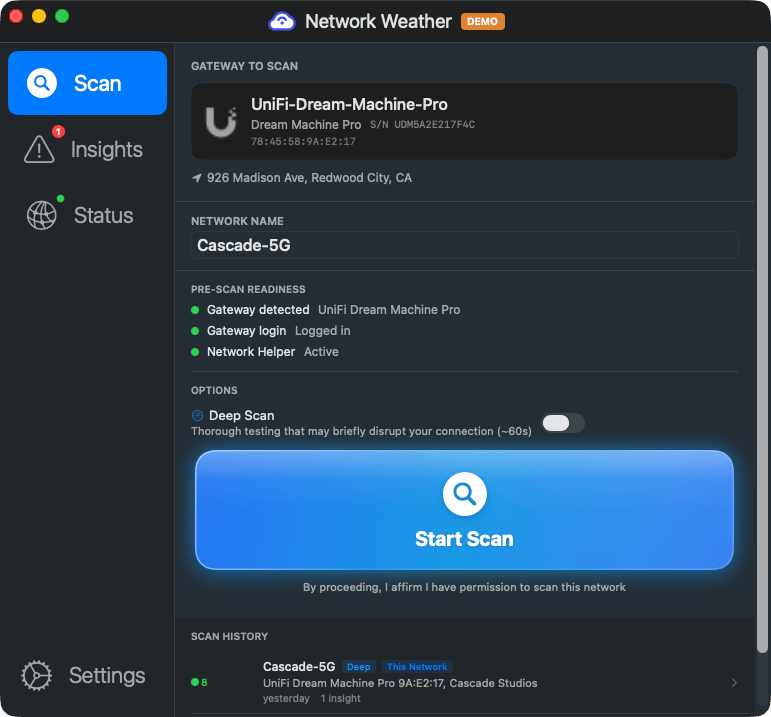
ZDX sees the gateway IP address, but not the vendor, model, or firmware version. It cannot tell you whether someone is behind an end-of-life Netgear or a current UniFi Dream Machine. Network Weather identifies 11+ router brands automatically via UPnP, mDNS, and HTTP fingerprinting.
No router security scanning
No firmware version checks, no CVE lookups, no UPnP exposure detection, no WPS audit, no default password checks. The home router is a blind spot. Network Weather checks all of this and tells the user what to do about it.
Notifications, not remediation
ZDX's Self Service feature (Advanced Plus only) sends notifications like "your WiFi is weak." It does not guide the user through specific fixes for their specific hardware. Network Weather tells the employee what router they have, what's wrong with it, and how to fix it. No ticket needed.
Requires the Zscaler platform
ZDX comes in three tiers (Standard, Advanced, Advanced Plus), all requiring an existing Zscaler deployment. No standalone option for SMBs or MSPs. Network Weather works independently with no platform prerequisite.
As Jeremy Bauer, CISO of Molson Coors, noted: "With ZDX, when a user calls about a connectivity issue, we can immediately see whether it's their ISP, Wi-Fi signal, or an application issue." That visibility is valuable, but it still requires the user to call and IT to look. Network Weather puts diagnostics and remediation directly in the employee's hands.
What your remote workers actually see
Network Weather gives employees answers, not dashboards
Side-by-side feature comparison
What each tool covers at the home network level
| Capability | Zscaler ZDX | Network Weather |
|---|---|---|
| Cloud path tracing (hop-by-hop) | ✓ Full AS-level path | ✓ Traceroute with ISP identification |
| WiFi signal strength | ✓ Advanced Plus only | ✓ All tiers |
| WiFi channel interference scanning | ✗ | ✓ Neighbor AP enumeration, SNR, noise floor |
| Radio environment scanning (802.11 IE parsing) | ✗ | ✓ BSSID resolution, AP vendor detection |
| Gateway vendor/model detection | ✗ | ✓ 11+ brands via UPnP, mDNS, HTTP fingerprint |
| Gateway vendor API integration | ✗ | ✓ UniFi, ASUS, TP-Link, Netgear, Eero, and more |
| Firmware version check | ✗ | ✓ With vendor API integration |
| End-of-life / end-of-support detection | ✗ | ✓ Vendor EOL databases |
| CVE lookup for router firmware | ✗ | ✓ |
| UPnP / WPS exposure detection | ✗ | ✓ |
| Default password detection | ✗ | ✓ |
| LAN device enumeration (ARP, DHCP) | ✗ | ✓ |
| ISP gateway / cable modem detection | ✗ | ✓ |
| VPN detection and performance attribution | ✓ Zscaler tunnels only | ✓ Any VPN provider |
| End-user self-triage with fix guidance | Notifications only (Adv+ tier) | ✓ Plain-English, hardware-specific |
| Works offline | ✗ | ✓ Guidance available even when connection is down |
| UCaaS quality monitoring | ✓ Zoom, Teams, WebEx | Forthcoming Q3 2026 |
| Compliance visibility (router infrastructure) | ✗ | ✓ Vendor, model, firmware, EOL, security posture |
| Standalone (no platform prerequisite) | ✗ Requires Zscaler | ✓ |
| Free consumer tier | ✗ | ✓ |
Who should use Zscaler ZDX vs Network Weather
They solve different problems. Sometimes you need both.
Choose Zscaler ZDX when you need
- Full cloud path visibility from endpoint to SaaS application
- UCaaS quality monitoring (Zoom, Teams, WebEx MOS scores)
- AI-powered root cause analysis across your Zscaler infrastructure
- Deep Tracing with remote packet capture for IT investigators
- A single-vendor SASE + DEX story for procurement
Choose Network Weather when you need
- Verify employees connect from compliant network infrastructure: router vendor, model, firmware currency, EOL status, and security posture for audits and attestations (SOC 2, HIPAA, FedRAMP, CMMC)
- Employee self-triage with specific, hardware-aware fix instructions
- Security scanning of remote worker home networks (CVEs, EOL, UPnP, WPS)
- A standalone tool that works without a platform prerequisite
- Coverage for MSP clients, SMBs, or any environment without Zscaler
Many enterprises deploy both. ZDX monitors the cloud path and application performance. Network Weather handles the last 30 feet: the home WiFi, the consumer router, and the ISP gateway that ZDX can see but cannot diagnose.
See what ZDX can't
Give your remote workers the tools to diagnose and fix their own home network issues. No Zscaler deployment required.